Server Manager2 create panel for contrib
Introduction
Server Manager 2 is based on the perl library Mojolicious and has as its central tenet that the html structure is kept separate from the content that is displayed, giving a lot of flexibility. It has a structure so that the web pages can have a theme applied independant of the content. Behind the scenes a non blocking web server does the actual work, and comes with lots of additional plugins.
Some details about the implementation and installation of Server manager 2 can be found here.
Initially the default theme mimics the current Server Manager pages (which is based on formMagick), however a new theme has also been developed which is based on AdminLTE.
If you follow the rules in this document, then your page should work in both themes without any trouble!
I am using the example of the DHCP Manager contrib which has a simple initial panel and some subsidiary panels. I'll concentrate just on the main panel and the DHCP leases subpanel.
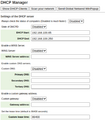
Front Panel
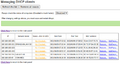
DHCP Leases


Installing Server Manager2
Ultimately Server Manager 2 will be part of the base release, and installed automatically as part of the installation.
However (Feb 2022) until it is deemed stable enough it needs to be installed specifically from the development/testing repos:
yum install smeserver-manager smeserver-manager-AdminLTE js-jquery --enablerepo=smedev,smetest,smecontribs
you can access the new server manager as follows:
<your server FQDN or Ip address>/smanager
Directory Structure
/usr/share/smanager
├── conf - contains preferences file.
├── data
├── lib
│   └── SrvMngr
│       ├── Controller - contains .pm files one for each module
│       ├── I18N
│       │   └── Modules
│       │       ├── Backup
...snip ....one for each module - contains translation strings
│       │       ├── Xt_geoip
│       │       └── Yum
│       ├── Model
│       └── Plugin
├── log
├── script
├── t
└── themes
    └── default
        ├── public
        │   ├── css
        │   ├── images
        │   └── js
        └── templates - top level .html.ep file (one per theme)
            ├── layouts - contains one .html.ep file for each module
            └── partials - contains partial files - as many as required for modules
                           (generally corresponds to subsidiary panels)
So each module (contrib in this case), consists of at least 3 files:
- .pm file of perl in the controller directory to gather up the content into a data structure (generally a hash or array)
- .lex or .pm in the I18n/modules directory consisting of translation strings. The system will generate the .pm file from the .lex file, but will use a .pm file if it is there.
- .html.ep file in the themes/default/templates/layout directory being the top level panel plus includes to subsidiary panels. ep stands for "Extended Perl".
- In addition there may be "extra" .html.ep files in the themes/default/templates/layout/partials directory, which are conditionally included in the top level panel code. By convention the partial files have a specific filename structure "_<module id>_<function>.html.ep". I don't think this is enforced anywhere. It looks like a convention to "underline" that fact that they are only called internally.
Configuration/Preferences File
This is found in /usr/share/smanager/conf/srvmngr.conf. Initial contents are:
#------------------------------------------------------------
#              !!DO NOT MODIFY THIS FILE!!
#
# Manual changes will be lost when this file is regenerated.
#
# Please read the developer's guide, which is available
# at http://www.contribs.org/development/
#
# Copyright (C) 1999-2006 Mitel Networks Corporation
#------------------------------------------------------------
{
# configuration file for Mojolicious Server-Manager2 application
#
    secrets => ['blah blah'],
    theme => 'default',
    # session timeout
    timeout => '300',
    hypnotoad => {
    ## adresses and ports listened
        listen => ['http://127.0.0.1:982'],
        proxy  => 1,
        pid_file => '/var/run/smanager.pid',

    ## process number based on CPU number [x 2]
        workers => (`grep processor /proc/cpuinfo | wc -l` * 2),

    ## connections queue size, per worker
        accepts => 100,

    ## propriétaire et groupe du serveur
        user => 'admin',
        group => 'admin'
    },
    # is js-jquery available
    hasJquery => 1,
    modules_dir => 'lib/SrvMngr/Controller',
    webapp => 'smanager',
    mode => 'production',
    debug => 0,
}
If you change the "mode" => "development", then when you get a runtime error it will show you the context. Otherwise it just gives a generic error message.
The file is templated so every time you reload the rpm then it will get set to "production", unless you add a custom template to:
"/etc/e-smith/templates/usr/share/smanager/conf/srvmngr.conf" to override it.
Later you will see how to access the "debug" property in your perl code which can be used to switch on and off diagnostic information.
Here's the contents of my "/etc/e-smith/templates-custom/usr/share/smanager/conf/srvmngr.conf/30other":
    modules_dir => 'lib/SrvMngr/Controller',
    webapp => 'smanager',
    mode => 'development',
    debug => 1,
\}
The files we need
So, we'll create the following files for the new SM2 panel(s) for the DHCPManager contrib.
- /usr/share/smanager/lib/SrvMngr/Controller/Dhcpd.pm
- /usr/share/smanager/lib/SrvMngr/I18N/Modules/Dhcpd/dhcpd_en.lex
- /usr/share/smanager/themes/default/templates/dhcpd.html.ep
- /usr/share/smanager/themes/default/templates/partials/_dhcpd_leases.html.ep
Note the initial capital letter on the file name for the controller file, and also the Translation directory. I believe that the "automatic" navigation menu creation requires this.
Converting from formMagick
if you are converting an existing contrib with a formMagick panel, then you will want to use the current files as a basis for the re-write.
For the DHCP manager contrib, these are:
- /etc/e-smith/web/functions/dhcpd
- and sometimes a file in here: /usr/share/perl5/vendor_perl/esmith/FormMagick/Panel Although in this case there is not. (and I find that directory structure impossible to remember - "esmith" sans "-" throws me).
- and translatable strings in here: /etc/e-smith/locale/en-us/etc/e-smith/web/functions/<contrib name> the format is XML- like whereas SM2 requires a more perl l- ike structure.
I have not really understood how formMagick works, but mostly the subroutine names and code shows what is needed.
Coding Environment
I work using a "test" SME10 VM accessed through an SSH tunnel (setup in the fstab) from my Fedora/Cinnamon desktop using the "geany" editor.
Here is the fstab entry:
root@sme10.thereadclan.me.uk:/ /home/brianr/SME10 fuse.sshfs rw,auto 0 0
I'll setup a geany project with all the above files open in tabs. Opening the editor project will open all the files in one go, assuming that the mapping to SME10 is live (sometime I have to manually mount it in Nemo, especially after the desktop has been suspended for a while).
Your mileage may of course vary!! Other editors etc are available.
I can then run the Server Manager in a browser against the SME10 VM, and make changes directly into the VM and see the results quickly.
Sometimes the changes require a:
signal-event smanager-refresh
and sometimes I need to use CTL-F5 to refresh the browser cache before seeing the result of a change (especially CSS changes)
Remember to set Mode = "development" in the mojolicious config file so that Perl run time errors are shown usefully. See above.
The Controller File (Dhcpd.pm)
Here is the heading for the controller file.:
package SrvMngr::Controller::Dhcpd;

#----------------------------------------------------------------------
# heading     : Network
# description : DHCP manager
# navigation  : 2000 2500
#
# name   : dhcpd,    method : get,  url : /dhcpd,     ctlact : Dhcpd#main
# name   : dhcpd1,   method : get,  url : /dhcpd1,    ctlact : Dhcpd#do_leases
# name   : dhcpd2,   method : get,  url : /dhcpd2,    ctlact : Dhcpd#do_winpopup
# name   : dhcpd3,   method : get,  url : /dhcpd3,    ctlact : Dhcpd#do_scan
# name   : dhcpd4,   method : get,  url : /dhcpd4,    ctlact : Dhcpd#do_delete_all_leases
# name   : dhcpd5,   method : post, url : /dhcpd5,    ctlact : Dhcpd#do_update_config
# name   : dhcpd6,   method : get,  url : /dhcpd6,    ctlact : Dhcpd#do_delete_one_lease
# name   : dhcpd7,   method : get,  url : /dhcpd7,    ctlact : Dhcpd#do_refresh_leases
# name   : dhcpd8,   method : get,  url : /dhcpd8,    ctlact : Dhcpd#do_winpopup
# name   : dhcpd9,   method : get,  url : /dhcpd9,    ctlact : Dhcpd#do_wol
# name   : dhcpd10,  method : post, url : /dhcpd10,   ctlact : Dhcpd#do_update_check
#
# routes : end
#
#
# Documentation: https://wiki.koozali.org/Dhcpmanager
#
The Server Manager 2 system extracts these "comments" from the header of the controller file and builds the navigation menu and the routing tables accordingly.
The Navigation menu controls are described in here (search for "Navigation metadata").
The best link I can find for a description of Mojolicious routes is here.
Perl Main and sub-routines
use strict;
use warnings;
use Mojo::Base 'Mojolicious::Controller';

use constant FALSE => 0;
use constant TRUE  => 1;

use Locale::gettext;
use SrvMngr::I18N;
use SrvMngr qw(theme_list init_session);

use Data::Dumper;
use esmith::util;
use esmith::HostsDB;
use esmith::AccountsDB;
use Net::Ping;
use esmith::util::network qw(:all);
use Socket qw( inet_aton );

my %dhcp_data = ();
Necessary library units are identified and Configuration databases opened and the hash to be used to communicate with the template files is initialised.
As can be seen from the routing tables the following routines are specified to be the receipt of control depending on the web page user. I
In simplified terms these are the routines.
Updated in Feb 2024 - this code is the current at this time.
my %dhcp_data = ();

sub main {
    #
    # Initial page - full summary of parameters etc
    # Initial para from the Wiki.
    #
    my $c = shift;
    %dhcp_data = ();
	do_display($c);
}

sub do_display {
    #
    # Front parameters page
    #
    my $c = shift;
    $c->app->log->info( $c->log_req );
    my $title = $c->l("dhcpd_DHCP manager");
    my $modul = '';
    my $trt   = "SETTINGS";
	our $db  = esmith::ConfigDB->open() or die("Unable to open Configuration DB");
	our %sme_conf = $db->get('dhcpd')->props;
	our %smb_conf = $db->get('smb')->props;
    $dhcp_data{trt} = $trt;
    $dhcp_data{"status"} = [[$c->l('dhcpd_ENABLED'),'enabled'],
                            [$c->l('dhcpd_DISABLED'),'disabled']
                            ];

	$dhcp_data{"check"}  = [[$c->l('dhcpd_ENABLED'),'enabled'],
                            [$c->l('dhcpd_DISABLED'),'disabled']
                            ];
	if (! $sme_conf{'winscustom'} ) {
		$sme_conf{'winscustom'} = 'disabled' ;
	}
	if (! $sme_conf{'dnscustom'} ) {
		$sme_conf{'dnscustom'} = 'disabled' ;
	}
	if ( ! $sme_conf{'leasetime'} )
	{ $sme_conf{'leasetime'} =  "86400" ;
	}
	if (! $sme_conf{'gatewaycustom'} ) {
		$sme_conf{'gatewaycustom'} = 'disabled' ;
	}
    # Accumulate parameters for Configuration DB
    $dhcp_data{'params'} = \%sme_conf;
    $dhcp_data{'smbparams'} = \%smb_conf;
    $c->stash( 	title => $title,
				modul => $modul,
				dhcp_data => \%dhcp_data
				);
	#die("here");
    $c->render( template => 'dhcpd' );
}

sub do_leases {
	#
	# Show a table of the leases
	#
	my $c = shift;
    my $title = $c->l("dhcpd_MANAGING_DHCP_CLIENT");
    my $modul = '';
    my $trt   = "LEASES";
   	$dhcp_data{"check"}  = [[$c->l('dhcpd_ENABLED'),'enabled'],
							[$c->l('dhcpd_DISABLED'),'disabled']
                            ];
    $dhcp_data{trt} = $trt;
    $dhcp_data{"first"} = '';
    my @leases = get_leases_in_array($c);
    $c->stash( title => $title, modul => $modul, dhcp_data => \%dhcp_data, leases=> \@leases );
    $c->render( template => 'dhcpd' );
}


sub do_scan {
	#
	# call to show scan results
	#
	my $c = shift;
    my $title = $c->l("dhcpd_SCANNING_NETWORK_TITLE");
    my $modul = '';
    my $trt   = "SCAN";
    $dhcp_data{trt} = $trt;
    $dhcp_data{"first"} = '';
	# ..... get scan results into stash for passing to html template
	my $dhcp_scanresults = get_scan_results($c);
    $c->stash( title => $title, modul => $modul, "dhcp_data" => \%dhcp_data, "scanresults" => $dhcp_scanresults);
    $c->render( template => 'dhcpd' );
}

sub do_update_config {
	#
	# Update config dhcp parameters
	# called through form submit.
	#
	my $c = shift;
	# Input results are in $c->param(<fieldname>).
	# If parameters do not validate, then return error message.
	# else write into config DB, and...
	# signal-event and ...return ok
	$dhcp_data{"success"}  ="";
	my $ret = Main_Save($c);
	if ($ret eq 'ok') {
		$dhcp_data{"success"}="dhcpd_SUCCESSFULLY_SAVED_SETTINGS";
	} else {
		$dhcp_data{"error"}=$ret;
	}
	do_display($c);
    return;
}

sub do_update_check {
	#Just update the check parameter
	my $c = shift;
    my $dhcpd_check = $c->param ('dhcp_check');
    ###Update SME configuration dbase
    my $dbh_sme = esmith::ConfigDB->open('/home/e-smith/db/configuration');
    ##Initiate get method --> create record object
    my $sme_record  = $dbh_sme->get('dhcpd');
    $sme_record->set_prop('check' , $dhcpd_check);
	$dhcp_data{"success"}="dhcpd_SUCCESSFULLY_SAVED_SETTINGS";
    do_display($c);
	return;
}
Things to notice are the use of the "Stash" to communicate between the controller and the .ep file (mainly by pointers to data structures) and the need to pass the $c data structure through the routines as a parameter.
The Main_Save procedure is stolen almost entirely from the original formMagick code:
sub Main_Save ($){

    ##Pull CGI object from parameters array
    my $q = shift;

    ###Build Hash of config parameters to update from cgi submit
    my $dhcpd_status     	= $q->param ('dhcp_enable');
    my $dhcpd_winscustom    = $q->param ('dhcp_winscustom');
    my $dhcpd_check     	= $q->param ('dhcp_check');
    my $dhcpd_start     	= $q->param ('dhcp_start');
    my $dhcpd_end     	    = $q->param ('dhcp_end');
    my $dhcpd_winsserver    = $q->param ('dhcp_winsserver');
    my $dhcpd_leasetime     = $q->param ('dhcp_leasetime');
    my $dhcpd_dnscustom     = $q->param ('dhcp_dnscustom');
    my $dhcpd_dns1server    = $q->param ('dhcp_dns1server');
    my $dhcpd_dns2server    = $q->param ('dhcp_dns2server');
    my $dhcpd_dns3server    = $q->param ('dhcp_dns3server');
    my $dhcpd_gatewaycustom = $q->param ('dhcp_gatewaycustom');
    my $dhcpd_gateway     	= $q->param ('dhcp_gateway');

    ###Update SME configuration dbase
    my $dbh_sme = esmith::ConfigDB->open('/home/e-smith/db/configuration');

    ##Initiate get method --> create record object
    my $sme_record  = $dbh_sme->get('dhcpd');
    #get localip of server
    my $local_ip    = $dbh_sme->get_value('LocalIP');

    ##Set status of service
    $sme_record->set_prop('status', $dhcpd_status);
    $sme_record->set_prop('check' , $dhcpd_check);
    $sme_record->set_prop('winscustom', $dhcpd_winscustom);
    $sme_record->set_prop('leasetime' , $dhcpd_leasetime);
    $sme_record->set_prop('dnscustom' , $dhcpd_dnscustom);
    $sme_record->set_prop('gatewaycustom' , $dhcpd_gatewaycustom);

    #checkip to the dhcpserver, perform the save in DB configuration or display an error if value != of a valid ip or if dhcp_start is greater than dhcp_end


    if ($dhcpd_status eq "enabled")
    {
        if ( isValidIP ($dhcpd_start) && isValidIP ($dhcpd_end))
        {
            #check if $dhcpd_start is greater than $dhcpd_end and if yes, display an error message.

            if (inet_aton($dhcpd_start) ge inet_aton($dhcpd_end))
            {
             return $q->l('dhcpd_DHCP_START_GREATER_DHCP_END_ERRORS') . ' (' . $dhcpd_start . '/' . $dhcpd_end .')';
            }
            elsif ( ( (inet_aton($dhcpd_start) le inet_aton($local_ip) ) && ( inet_aton($dhcpd_end)) ge inet_aton($local_ip) ) )
            {
            #display an error if the range of dhcp server include the ip of the server address
            return $q->l('dhcpd_DHCP_RANGE_MUST_NOT_INCLUDE_SERVER_IP') . ' (' . $local_ip . ')';
            }
            else
            {
            #set value
            my $dhcpd_start = cleanIP($dhcpd_start);
            my $dhcpd_end = cleanIP($dhcpd_end);

            $sme_record->set_prop('end', $dhcpd_end);
            $sme_record->set_prop('start', $dhcpd_start);
            }
        }
        #if $dhcpd_start or $dhcpd_end are not valid ip then display an error
        else
        {
        return $q->l('dhcpd_DHCP_RANGE_WITH_BAD_IP') . ' (' . $dhcpd_start . '/' . $dhcpd_end .')';
        }
    }

    #checkip to the winserver perform the save in DB configuration or display an error if value != of a valid ip
    if ($dhcpd_winscustom eq "enabled")
    {

        if ( isValidIP ($dhcpd_winsserver) )
        {
        #set value
        my $dhcpd_winsserver = cleanIP($dhcpd_winsserver);
        $dbh_sme->set_prop('smb','WINSServer', $dhcpd_winsserver);
        }
        else
        {
        #if $dhcpd_winsserver is not valid ip then display an error
        return $q->l('dhcpd_WINSSERVER_BAD_IP') . ' (' . $dhcpd_winsserver .')';
        }
    }
    elsif ($dhcpd_winscustom eq "disabled")
    {
        my $delws = $dbh_sme->get('smb');
        $delws->delete_prop('WINSServer');
    }

    #checkip to the dnsserver custom, perform the save in DB configuration or display an error if value != of a valid ip
    if ($dhcpd_dnscustom eq "enabled")
    {
        #check if $dhcpd_dns1server and ( $dhcpd_dns2server are valid ip or $dhcpd_dns2server = null )
        if ( isValidIP ($dhcpd_dns1server) &&  (isValidIP($dhcpd_dns2server) || ( $dhcpd_dns2server eq "")  ) &&  (isValidIP($dhcpd_dns3server) || ( $dhcpd_dns3server eq "")  )   )
        {
        #set value
        my $dhcpd_dns1server = cleanIP($dhcpd_dns1server);
        $sme_record->set_prop('dns1server' , $dhcpd_dns1server);
        my $dhcpd_dns2server = cleanIP($dhcpd_dns2server);
        $sme_record->set_prop('dns2server' , $dhcpd_dns2server);
        my $dhcpd_dns3server = cleanIP($dhcpd_dns3server);
        $sme_record->set_prop('dns3server' , $dhcpd_dns3server);
        }
        else
        {
        ##if $dhcpd_dns1server or $dhcpd_dns2server or $dhcpd_dns3server are not valid ip then display an error
        return $q->l('dhcpd_DNS_SERVER_WITH_BAD_IP') . ' (' . $dhcpd_dns1server . '/' . $dhcpd_dns2server . '/' . $dhcpd_dns3server .')';
        }
    }

    #checkip to the gateway_custom perform the save in DB configuration or display an error if value != of a valid ip
    if ($dhcpd_gatewaycustom eq "enabled")
    {
        if ( isValidIP ($dhcpd_gateway) )
        {
        #set value
        my $dhcpd_gateway = cleanIP($dhcpd_gateway);
        $sme_record->set_prop('gateway' , $dhcpd_gateway);
        }
        else
        {
        #if $dhcpd_gateway is not valid ip then display an error
        return $q->l('dhcpd_GATEWAY_BAD_IP') . ' (' . $dhcpd_gateway .')';
        }
    }


    # - 4 expand templates
    # changed to new sme standard signal-event
    system ("/sbin/e-smith/signal-event","workgroup-update") == 0
                or die "Error while saving settings: $!";
   return 'ok';
    exit;
}
The routine extracts the input field values through the $c-<param routine and validates them, returning an error message if the validation fails and otherwise writing the results back to the DB.
The Message names had to have "dhcpd_" added to them, the localise routine name needed editing. $q replaces $c in other routines for legacy reasons. Note the return string is either an error message OR the "ok" string.
The Template Files (dhcpd.html.ep and partials)
The top level .ep file starts like this:
% layout 'default', title => "Sme server 2 - DHCP Manager", share_dir => './';

% content_for 'module' => begin

<div id="module" class="module dhcpman-panel">

    % if ($config->{debug} == 1) {
	<p>
		%= dumper $c->current_route
	</p>
    % }

    <h1><%=$title%></h1>
     %= $modul

   	%if ($dhcp_data->{first}) {
	    <br><p>
		%=$c->render_to_string(inline =>$c->l($dhcp_data->{first}))
		</p>
All Mojolicious commands are indicated by a "%" in the first non space character. If the next character is an equals sign then the result of the expression is output. Inline commands are inside pseudo-tags "<%" and "%>".
This is the best list I have found of the ep syntax:
<% Perl code %>
<%= Perl expression, replaced with XML escaped result %> Useful to be embedded in a line of html
<%== Perl expression, replaced with result %> (useful if the perl code emitts html tags)
<%# Comment, useful for debugging %>
<%% Replaced with "<%", useful for generating templates %>
% Perl code line, treated as "<% line =%>" (a full line of perl)
%= Perl expression line, treated as "<%= line %>" (a full line of perl replaced by the result)
%== Perl expression line, treated as "<%== line %>" (ditto, but allows html tags)
%# Comment line, useful for debugging
%% Replaced with "%", useful for generating templates
Lines which do not start with a "%" are output anyway (and are usually htrml tags).
More details about the content of the .ep files are available here and here.
Please note the initial "div" which has a class of "module" and "<modulename>-panel". This allows specific formatting in the AdminLTE theme.
Also note the use of "debug" config field. This can be used to show debug information.
The next part comprises that common success and error panels, and then the branch according to the $trt parameter which controls which panel details are shown.
	%} elsif ($dhcp_data->{success}) {
		<div class='sme-border'>
	       <h2> Operation Status Report - success</h2><p>
			<font color=green>
			%= $c->l($dhcp_data->{success});
			</font>
			</p>
		</div>

	   %} elsif ($dhcp_data->{error}) {
	   <div class='sme-error'>
	       <h2> Operation Status Report - error</h2><p>
			<font color=red>
			%= $c->l($dhcp_data->{error});
			</font>
			</p>
    	</div>

	%}

	% if ($dhcp_data->{trt} eq 'LEASES') {
		%= include 'partials/_dhcpd_leases'
	%} elsif ($dhcp_data->{trt} eq 'SCAN') {
		%= include 'partials/_dhcpd_scan'
	%}
and finally the front panel details is defined:
	%} else {  					#PARAMS
		% my $ip_regex = '^((\d{1,2}|1\d\d|2[0-4]\d|25[0-5])\.){3}(\d{1,2}|1\d\d|2[0-4]\d|25[0-5])$';
		<table>
			<tr>
			<td>
				%= button_to $c->l('dhcpd_CONNECTED_IP') => '/dhcpd1', onclick=>"showSpinnerLeases()", id=>"scanLeases"
				<button class ="btn btn-primary spinnerButtonOverlay"  type = "submit" id="load" style="display:none">
				  Scanning  <!--%= $c->l('dhcpd_CONNECTED_IP')-->
				  <span class="spinner-border spinner-border-sm" role="status" aria-hidden="true"></span>
				</button>
			</td><td>
				%= button_to $c->l('dhcpd_SCAN_YOUR_NETWORK') => '/dhcpd3', onclick=>"showSpinnerNetwork()", id=>"scanNetwork"
				<button class ="btn btn-primary spinnerButtonOverlay"  type = "submit" id="loadingNetwork" style="display:none">
				  Scanning  <!--%= $c->l('dhcpd_CONNECTED_IP')-->
				  <span class="spinner-border spinner-border-sm" role="status" aria-hidden="true"></span>
				</button>
			</td>
			</tr>
		</table>
		<hr />
		<h2>
		%= $c->l("dhcpd_DHCPD_SETTINGS_TITLE")
		</h2>
		% my $btn = l('dhcpd_SAVE/RESTART');
		%= form_for '/dhcpd5' => (method => 'POST') => begin
			<span class=label>
				%=l 'dhcpd_CHECK_CLIENT_STATUS'
			</span><span class=data>
				% param dhcp_check=>$dhcp_data->{"params"}->{"check"};
				%=select_field  dhcp_check=>$dhcp_data->{"check"}
			</span><br>
			<br />
			<span class=label>
				%=l 'dhcpd_STATUS_DHCP_SERVER'
			</span><span class=data>
				% param dhcp_enable=>$dhcp_data->{"params"}->{"status"};
				%=select_field  dhcp_enable=>$dhcp_data->{"status"}
			</span><br>

			<span class=label>
				%=l 'dhcpd_DHCP_START'
			</span><span class=data>
				% param dhcp_start=>$dhcp_data->{"params"}->{"start"};
				%=text_field  'dhcp_start',minlength=>'7',maxlength=>"15",size=>"15",placeholder=>"nnn.nnn.nnn.nnn", pattern=>"$ip_regex"
			</span><br>

			<span class=label>
				%=l 'dhcpd_DHCP_END'
			</span><span class=data>
				% param dhcp_end=>$dhcp_data->{"params"}->{"end"};
				%=text_field  'dhcp_end',minlength=>'7',maxlength=>"15",size=>"15",placeholder=>"nnn.nnn.nnn.nnn", pattern=>"$ip_regex"
			</span><br><br />

			%= $c->l("dhcpd_CUSTOM_WINSERVER_TITLE");
			<br />

			<span class=label>
				%=l 'dhcpd_CUSTOM_WINSERVER_STATUS'
			</span><span class=data>
				% param dhcp_winscustom=>$dhcp_data->{"params"}->{"winscustom"};
				%=select_field  dhcp_winscustom=>$dhcp_data->{"status"}
			</span><br>

			<span class=label>
				%=l 'dhcpd_CUSTOM_WINSERVER_ADDRESS'
			</span><span class=data>
				% param dhcp_winsserver=>$dhcp_data->{"smbparams"}->{"WINSServer"};
				%=text_field  'dhcp_winsserver' ,minlength=>'7',maxlength=>"15",size=>"15",placeholder=>"nnn.nnn.nnn.nnn", pattern=>"$ip_regex"
			</span><br><br />

			%= $c->l("dhcpd_CUSTOM_DNS_TITLE");
			<br />
			<span class=label>
				%=l 'dhcpd_CUSTOM_DNS_STATUS'
			</span><span class=data>
				% param dhcp_dnscustom=>$dhcp_data->{"params"}->{"dnscustom"};
				%=select_field  dhcp_dnscustom=>$dhcp_data->{"status"}
			</span><br>

			<span class=label>
				%=l 'dhcpd_PRIMARY_DNS_ADDRESS'
			</span><span class=data>
				% param dhcp_dns1server=>$dhcp_data->{"params"}->{"dns1server"};
				%=text_field  'dhcp_dns1server' ,minlength=>'7',maxlength=>"15",size=>"15",placeholder=>"nnn.nnn.nnn.nnn", pattern=>"$ip_regex"
			</span><br>

			<span class=label>
				%=l 'dhcpd_SECONDARY_DNS_ADDRESS'
			</span><span class=data>
				% param dhcp_dns2server=>$dhcp_data->{"params"}->{"dns2server"};
				%=text_field  'dhcp_dns2server' ,minlength=>'7',maxlength=>"15",size=>"15",placeholder=>"nnn.nnn.nnn.nnn", pattern=>"$ip_regex"
			</span><br>

			<span class=label>
				%=l 'dhcpd_TERTIARY_DNS_ADDRESS'
			</span><span class=data>
				% param dhcp_dns3server=>$dhcp_data->{"params"}->{"dns3server"};
				%=text_field  'dhcp_dns3server' ,minlength=>'7',maxlength=>"15",size=>"15",placeholder=>"nnn.nnn.nnn.nnn", pattern=>"$ip_regex"
			</span><br>

			%= $c->l("dhcpd_CUSTOM_GATEWAY_TITLE");
			<br />
			<span class=label>
				%=l 'dhcpd_CUSTOM_GATEWAY_STATUS'
			</span><span class=data>
				% param dhcp_gatewaycustom=>$dhcp_data->{"params"}->{"gatewaycustom"};
				%=select_field  dhcp_gatewaycustom=>$dhcp_data->{"status"}
			</span><br>

			<span class=label>
				%=l 'dhcpd_CUSTOM_GATEWAY_ADDRESS'
			</span><span class=data>
				% param dhcp_gateway=>$dhcp_data->{"params"}->{"gateway"};
				%=text_field  'dhcp_gateway' ,minlength=>'7',maxlength=>"15",size=>"15",placeholder=>"nnn.nnn.nnn.nnn", pattern=>"$ip_regex"
			</span><br><br />
				%= $c->l("dhcpd_CUSTOM_LEASETIME_TITLE");
			<br />
			<span class=label>
				%=l 'dhcpd_CUSTOM_LEASETIME'
			</span><span class=data>
				% param dhcp_leasetime=>$dhcp_data->{"params"}->{"leasetime"};
				%=number_field  'dhcp_leasetime'
			</span><br><br />
			%= submit_button "$btn", class => 'action'
		% end
This shows the top few controls for the panel. Note the use of the table to keep the buttons in a row and also the structure of each parameter row involving the <span> tags and the <br> to create newlines. Use of this structure will keep your panel in line with both the default and the AdminLTE themes. You need not do this of course!
From the form command at the top it can be seen that clicking the "Save/Restart" button will lead to a routing through dhcpd5 which will result in the perl sub "do_update_config" being executed, which will save all the parameters back to the DB.
The Partials files can be used to keep the structure in multiple files.
We will look at just one to display the lease table.
<div id='dhcpd-leases'>
	<table><tr><td>
		%= button_to $c->l('dhcpd_REFRESH') => '/dhcpd1', onclick=>"showSpinnerLeases()", id=>"scanLeases"
		<button class ="btn btn-primary spinnerButtonOverlay"  type = "submit" id="load" style="display:true">
		  Scanning  <!--%= $c->l('dhcpd_CONNECTED_IP')-->
		  <span class="spinner-border spinner-border-sm" role="status" aria-hidden="true"></span>
		</button>

		</td><td>
		%= button_to $c->l('dhcpd_REMOVE_ALL_LEASES') => '/dhcpd4'
		</td>
		</tr>
    </table>

	% my $btn = l('dhcpd_SAVE/RESTART');
	%= form_for '/dhcpd10' => (method => 'POST') => begin
		<span class=label>
			%=l 'dhcpd_CHECK_CLIENT_STATUS'
		</span><span class=data>
			% param dhcp_check=>$dhcp_data->{"params"}->{"check"};
			%=select_field  dhcp_check=>$dhcp_data->{"check"}
		</span><br>
		<br />
   		%= $c->l("dhcpd_SAVE_TITLE");
		<br />
		%= submit_button "$btn", class => 'action'
    % end
    <br>
	<table class="sme-border TableSort"><thead>
		<tr>
			<th class='sme-border'>
				%=l 'dhcpd_IP'
			</th>
				<th class='sme-border'>
				%=l 'dhcpd_NETWORK_NAME'
			</th>
			<th class='sme-border'>
				%=l 'dhcpd_STATUS_CLICK_FOR_WOL'
			</th>
			<th class='sme-border'>
				%=l('dhcpd_START_DATE',"")
			</th>
			<th class='sme-border'>
				%=l 'dhcpd_END_DATE'
			</th>
			<th class='sme-border'>
				%=l 'dhcpd_MAC_ADDRESS'
			</th>
			<th class='sme-border' colspan=2>
				%=l 'dhcpd_ACTION'
			</th>
		</tr>
		</thead>
		<tbody>
        % foreach my $ip (@$leases) {
        <tr>
			%= t td => (class => 'sme-border') => $ip->{ip}
			%= t td => (class => 'sme-border') => $ip->{name}
			<td class='sme-border'>
				% if ($ip->{wol} =~ /ACTIVE/) {
					<center><%==l $ip->{wol}%></center>
				%} else {
					<a href="/smanager/dhcpd9??state=wake_up&MAC=<%= $ip->{mac}%>&name=<%= $ip->{name}%>" onclick="Wol_confirm(event,'<%=$c->l('dhcpd_WAKING_A_REMOTE_COMPUTER')%>',this);"><center><%==l $ip->{wol}%></center></a>
				%}
			</td>
			%= t td => (class => 'sme-border') => $ip->{start}
			%= t td => (class => 'sme-border') => $ip->{end}
			%= t td => (class => 'sme-border') => $ip->{mac}
			<td class = 'sme-border'>
				<a href="/smanager/dhcpd6?trt=DEL&ip=<%= $ip->{ip}%>&name=<%= $ip->{name}%>" onclick="Remove_lease_confirm(event,'<%=$c->l('dhcpd_REMOVE_A_DHCP_LEASE_ACTION')%>',this);"><center><%=l 'dhcpd_REMOVE'%></center></a>
			</td>
		</tr>
		%}
		</tbody>
		</table>
		%= hidden_field "hiddenmsg"=>"", id=>"hiddenmsg"
   	<br />
	%= button_to $c->l('dhcpd_CLICK_HERE_TO_MAIN_PANEL') => '/dhcpd'

	%= javascript begin
		function Wol_confirm(event,msg,current){
			const getMAC = /.*MAC\=(.*)\&name.*/;
			var MAC = current.href.match(getMAC)[1];
			if (confirm(msg+": MAC: "+MAC))
			{ return true;}
			else {event.preventDefault();return false;}
		}

		function Winpop_confirm(event,msg,current){
			const getIP = /.*ip\=(.*)/;
			var IP = ": IP: "+current.href.match(getIP)[1];
			msg = msg.replace("$",IP);
			var retVal = prompt(msg);
			if (retVal) {
				//Write it away in a hidden field
				$hidden = document.getElementById("hiddenMsg");
				$hidden.value = retVal;
				return true;
			} else {event.preventDefault();return false;}
		}

		function Remove_lease_confirm(event,msg,current){
			const getIP = /.*ip\=(.*)/;
			var IP = current.href.match(getIP)[1];
			if (confirm(msg+" IP: "+IP))
			{ return true;}
			else {event.preventDefault();return false;}
		}

	%end


</div>
Note the use of Javascript to present to user with dialogs for confirmation and the WinPopup msg. This was done in the original using extra panels. Although some do not like Javascript, I feel it is here to stay and presents opportunities in terms of interfaces that are best taken advantage of. The main challenge is to work out how to pass the various perl based data to and from the JS routines. Note I use a hidden field for this in one case. And the html request parameters for the others. It can be a challenge to get the mixture of double and single quotes correct!
Adding Javascript and CSS to the .ep file
You can use the tag helpers "Javascript" and "Stylesheet"to add inline content to a .ep file, here is an example from the DHCPManager to add notification that the scan is being performed. Under the AdminLTE theme, the button is changed to show a "Scanning" text and also a spinner. In the default theme thje text is shown, but the AdminLTE/Bootstrap spinner classes are ignored.
This code fits in between the final html tags and the "%end" command:
%= javascript begin
  document.getElementById("load").style.display="none";
  function showSpinner(){
	  document.getElementById("scanLeases").style.display="none";
	  document.getElementById("load").style.display="inline";
   }
%end

%= stylesheet begin
.spinnerButtonOverlay,
.spinnerButtonOverlay:hover,
.spinnerButtonOverlay:any-link ,
.spinnerButtonOverlay:focus ,
.spinnerButtonOverlay:active {
	appearance: auto;
    user-select: none;
    align-items: flex-start;
    cursor: default;
    box-sizing: border-box;
    background-color: #efefef;
    color: black;
    padding: 1px 6px;
    border-width: 2px;
    border-style: outset;
    border-color: darkgrey;
    border-image: initial;
}
%end
For completion sake here is the replacement button (with AdminLTE spinner) html/mojolicious helper tags:
		%= button_to $c->l('dhcpd_CONNECTED_IP') => '/dhcpd1', onclick=>"showSpinner()", id=>"scanLeases"
		<button class ="btn btn-primary spinnerButtonOverlay"  type = "submit" id="load" style="display:true">
		  Scanning  <!--%= $c->l('dhcpd_CONNECTED_IP')-->
		  <span class="spinner-border spinner-border-sm" role="status" aria-hidden="true"></span>
		</button>
Note the Id codes used to allow the JS to find the controls.
Translation Strings files
Here is a sed script and extra commands to take a formMagick strings file and make it into a lex file suitable for SM2.
Create a sed script file (cnv_lexi.vi):
/lexicon/ d
/entry/ d
s/'/\\'/g
s/<base>/'ddc_/
s/<\/base>/' => /
s/<trans>/'/
s/<\/trans>/',/
s/\t//g
s/<!\[CDATA\[//g
s/]]>//g
/^$/d
s/        '/'/g
s/         //g
s/=> \n/=> /g
Then the shell script to run it: (extractlex.sh):
#!/bin/sh
cp /etc/e-smith/locale/en-us/etc/e-smith/web/functions/$1 $1.res
sed -f cnv_lexi.vi /etc/e-smith/locale/en-us/etc/e-smith/web/functions/$1 $1.res | tr "\n" "~" | sed 's/\s+~/~/g' | sed 's/~,/,/g' | sed "s/~'~/'/g" | sed s/"~',~'/',~/g" | tr "~" "\n" > $1.lex
Run it by:
./extractlexi.sh dhcpd
You will need to edit the "ddc_" prefix in the .lex file to conform to whatever you want to use.
Then run:
signal-event smanager-refresh
Which will loop through all the lex files and create corresponding .pm files where they do not exist. This could go in the (rpm) install inside the createlinks file (remember to delete the .pm file(s) first).
The .lex File
The .lex file (dhcpd_en.lex) contains just the mappings between the language independant messages and the actual messages (in this case in English):
'dhcpd_DHCP manager' =>
'DHCP Manager',
'dhcpd_DHCPD_TITLE' =>
'DHCP Manager',
'dhcpd_DHCPD_SETTINGS_TITLE' =>
'Settings of the DHCP server',
'dhcpd_CONNECTED_IP' =>
'Show DHCP Clients',
'dhcpd_SCAN_YOUR_NETWORK' =>
'Scan your network',
'dhcpd_GLOBAL_WINPOPUP' =>
'Send Global Netsend WinPopup',
'dhcpd_CHECK_CLIENT_STATUS' =>
'Always check the status of computers (Disabled is much faster)',
The .pm File
The corresponding .pm file is created by the installation procedure (see below).
package SrvMngr::I18N::Modules::Dhcpd::en;
use strict;
use warnings;
use utf8;
use Mojo::Base 'SrvMngr::I18N';

use SrvMngr::I18N::Modules::General::en;

my %lexicon = (
'dhcpd_DHCP manager' =>
'DHCP Manager',
'dhcpd_DHCPD_TITLE' =>
'DHCP Manager',
'dhcpd_DHCPD_SETTINGS_TITLE' =>
'Settings of the DHCP server',
'dhcpd_CONNECTED_IP' =>
'Show DHCP Clients',
'dhcpd_SCAN_YOUR_NETWORK' =>
'Scan your network',
'dhcpd_GLOBAL_WINPOPUP' =>
'Send Global Netsend WinPopup',
'dhcpd_CHECK_CLIENT_STATUS' =>
'Always check the status of computers (Disabled is much faster)',
The file is genuine perl and forms part of the program code for the package.
(Re)Building the RPM
smeserver-dhcpmanager.spec file
In order for the lex file to be processed, and the header on the Controller file to be processed (navigation and routing), we need to call
signal-event smanager-refresh
during the installation process. This has to be in such a way that it only happens if the new server manager has been installed (i.e. the rpm smeserver-manager installed).
My current way to do this is to put the following code in the "%post" section of the .spec file:
if (systemctl list-unit-files |grep smanager) then
   echo "Smanager restart in spec file"   /sbin/e-smith/signal-event smanager-refresh
fi
In the fullness of time it might be better to put this in the smeserver-dhcpmanager-update event.
The Final Panels
The front panel and the DHCP leases panel:


What needs to be done
As part of the initial development all the base panels have been converted. Some of the "most" popular contribs have also been done (although we do not have any way of really knowing which is the most popular).
So many of the well known contribs have not been done.
Ones that have been done (Feb 2024) are:
- smeserver-BackupPC (but not entirely - bug 11701)
- smeserver-awstats
- smeserver-certificate
- smeserver-ddclient
- smeserver-dhcpmanager
- smeserver-domains (this one may not be finished)
- smeserver-durep
- smeserver-fail2ban
- smeserver-geneweb
- smeserver-qmHandle
- smeserver-vacation
- smeserver-wbl
- smeserver-webhosting
- smeserver-wireguard
- smeserver-xt_geoip
I suggest you take one of the contribs you currently use and give it a go!! Check with the dev team and on the forum in case someone else is working on your choice though.
We can provide you with support through the rocket chat hosted by John Crisp and/or the forum - ask on the forum to be added if you do not already have an account . Start by opening a bug for the changes.
This link will give you a list of contribs that have been released for SME10.
Bugs
Please raise bugs under the SME-Server section in bugzilla
and select the component or use this link
Below is an overview of the current issues for this package:
| ID | Product | Version | Status | Summary (176 tasks) ⇒ |
|---|---|---|---|---|
| 12995 | SME Server 11.X | 11.alpha1 | CONFIRMED | Tool tip shows "Account Locked" when it is not (see image) |
| 12991 | SME Server 11.X | 11.alpha1 | CONFIRMED | Add a message on the Reset Password form giving the current rules (according to the DB entry PasswordStrength) |
| 12990 | SME Server 11.X | 11.alpha1 | CONFIRMED | CSS template expand errors |
| 12989 | SME Server 11.X | 11.alpha1 | CONFIRMED | Workstation Restore when reboot is selected when offered SM2 errros to a Proxy Error screen and fails to reboot |
| 12988 | SME Server 11.X | 11.alpha1 | RESOLVED | Under smanager Remote Access Secure shell access value does not match config show sshd value |
| 12987 | SME Server 11.X | 11.alpha1 | VERIFIED | When webmail menu is selected window does not resize to show roundcube form, need to go to full window |
| 12985 | SME Server 11.X | 11.alpha1 | RESOLVED | SM2 adding port forwarding rule fails |
| 12984 | SME Server 11.X | 11.alpha1 | RESOLVED | Move the review Configuration menu entry to show only after login |
| 12974 | SME Server 11.X | 11.alpha1 | CONFIRMED | clamav config panel takes a long time even if "Never" and "Disabled" are set |
| 12973 | SME Server 11.X | 11.alpha1 | CONFIRMED | Email panel Delivery settings, internal mail server not properly validated. |
| 12972 | SME Server 11.X | 11.alpha1 | CONFIRMED | crash in Date Time panel when external ntp server specified |
| 12971 | SME Server 11.X | 11.alpha1 | CONFIRMED | Remote Access panel does not work the same way as other panels |
| 12970 | SME Server 11.X | 11.alpha1 | RESOLVED | DB Cacheing problem in Port forwarding panel |
| 12969 | SME Server 11.X | 11.alpha1 | CONFIRMED | Error message in Local Networks panel is inconsistent with the rest of SM2 |
| 12967 | SME Server 11.X | 11.alpha1 | RESOLVED | Rationalise the css |
| 12953 | SME Server 11.X | 11.alpha1 | RESOLVED | Add systemd-analyze plot >boot.svg to Report a bug panel |
| 12951 | SME Server 11.X | 11.alpha1 | RESOLVED | Mail log analysis panel needs re-write for Postfix. |
| 12950 | SME Server 11.X | 11.alpha1 | CONFIRMED | Need audit of all panels and languages and the coverage between them |
| 12949 | SME Server 11.X | 11.alpha1 | RESOLVED | Panel for SM2 for Nut UPS package. |
| 12948 | SME Server 11.X | 11.alpha1 | VERIFIED | Workstation backup configure form on incorrect entry and press update errors but only shows backup share field |
| 12947 | SME Server 11.X | 11.alpha1 | CONFIRMED | Desktop Backup does not allow anything after until screen is refreshed. |
| 12946 | SME Server 11.X | 11.alpha1 | RESOLVED | "Argument "" isn't numeric" Error message on every refresh of SM2 screen |
| 12943 | SME Server 11.X | 11.alpha1 | RESOLVED | Warning message about order of parameters to tar on desktop backup |
| 12934 | SME Server 11.X | 11.alpha1 | RESOLVED | Server -Error on Backup to desktop |
| 12933 | SME Server 11.X | 11.alpha1 | RESOLVED | Workstation Backup/restore settings not returning changes after resetting |
| 12932 | SME Server 11.X | 11.alpha1 | RESOLVED | Letsencrypt certificate 'check one domain' gives 'server error' |
| 12927 | SME Server 11.X | 11.alpha1 | RESOLVED | Remote Access access setting ftp to Public Access entire interne fails |
| 12924 | SME Server 11.X | 11.alpha1 | CONFIRMED | NFR: allow smanager setting for ftp Anonymous access |
| 12923 | SME Server 11.X | 11.alpha1 | RESOLVED | status select field can not be set to current value |
| 12918 | SME Server 11.X | 11.alpha1 | RESOLVED | Include End of Life, EOL, statement in Server Manager |
| 12916 | SME Server 11.X | 11.alpha1 | RESOLVED | move letsencrypt panel to smeserver-certificates |
| 12910 | SME Server 11.X | 11.alpha1 | RESOLVED | Webmail / Roundcube access from user panel and menu does not work if local DNS not used. |
| 12908 | SME Server 11.X | 11.alpha1 | CONFIRMED | sm2 v50 - Variable "$config" is not imported at template webhosting.html.ep line 6. |
| 12907 | SME Server 11.X | 11.alpha1 | RESOLVED | SM2 V50 - Server-Error on Review Configuration |
| 12905 | SME Server 11.X | 11.alpha1 | RESOLVED | Make SM2 db opening specific to the route, rather than opening only once |
| 12903 | SME Server 11.X | 11.alpha1 | CONFIRMED | The jDatatable tables do not reflect the current locale in terms of language etc. Only show English |
| 12901 | SME Server 11.X | 11.alpha1 | RESOLVED | Locale not consistently applied |
| 12900 | SME Server 11.X | 11.alpha1 | RESOLVED | Html shown in button labels on email panel italian locale |
| 12893 | SME Server 11.X | -- | RESOLVED | Country flag display uses a google data lookup to find country name |
| 12892 | SME Server 11.X | -- | RESOLVED | CSRF protection plugin causes error message when in production mode |
| 12891 | SME Server 11.X | -- | VERIFIED | Should only display "Reconfiguration required" based on Configuration/UnsaveChanges DB entry |
| 12889 | SME Server 11.X | -- | RESOLVED | Viewlogfiles panel has use perl::Time:TAI64 - not needed. |
| 12887 | SME Server 11.X | -- | RESOLVED | Make Version number only display on admin login |
| 12886 | SME Server 11.X | -- | VERIFIED | Add Mojolicious version to footer |
| 12885 | SME Server 11.X | -- | RESOLVED | Update to fix crash with perl-mojolicious 9.39 |
| 12884 | SME Server 11.X | -- | CONFIRMED | If the First / last name are already duplicated in another account, then the error message is not specific enough (and confusing) |
| 12870 | SME Server 11.X | -- | RESOLVED | Messages dropdown in View Log Files for Server manager 2 is too wide. |
| 12866 | SME Server 11.X | -- | CONFIRMED | server-manager letsencypt should have on/off for ip check |
| 12865 | SME Server 11.X | -- | VERIFIED | server-manager reconfigure returns blank page |
| 12864 | SME Server 11.X | -- | RESOLVED | server-manager letsencrypt panel spelling |
| 12847 | SME Server 11.X | -- | RESOLVED | unexpected path fails some action scripts |
| 12846 | SME Server 11.X | -- | RESOLVED | onclick should be replaced by href |
| 12845 | SME Server 11.X | -- | RESOLVED | flag-icon.min.css should not be provided by cloud flare |
| 12844 | SME Server 11.X | -- | RESOLVED | xxcolor unknown property for selector .login-button |
| 12843 | SME Server 11.X | -- | RESOLVED | cross request to external website should be removed |
| 12840 | SME Server 11.X | -- | RESOLVED | Server-Manager 2 CSP policy |
| 12839 | SME Server 11.X | -- | RESOLVED | there might be something hardcoded in userpanelaccess |
| 12838 | SME Server 11.X | -- | RESOLVED | DevTools failed to load source map: Could not load content for https://sme11bhs.pialasse.com/smanager/js/pdfmake.min.js.map: |
| 12837 | SME Server 11.X | -- | RESOLVED | External files from CDN need to be internal |
| 12828 | SME Server 11.X | -- | RESOLVED | Update JS components to latest version |
| 12810 | SME Server 11.X | -- | RESOLVED | Move Letsencrypt action routines to a new package smeserver-certificates and getmyip to smeserver-lib |
| 12803 | SME Server 11.X | -- | RESOLVED | Add password display icon on password panels for user, ibays and system |
| 12802 | SME Server 11.X | -- | RESOLVED | Red Error message does not respond to being compressed onto 2 lines (see attached) |
| 12788 | SME Server 11.X | -- | RESOLVED | AH01215: CGI::param called in list context can lead to vulnerabilities (Persistent) |
| 12762 | SME Server 11.X | -- | RESOLVED | No valid prefix found in any entries |
| 12758 | SME Server 11.X | -- | RESOLVED | After install a "signal-event smanager-refresh" is needed before SM2 comes up. |
| 12757 | SME Server 11.X | -- | RESOLVED | Arrange that all language translations are installed with smeserver-manager |
| 12756 | SME Server 11.X | -- | CONFIRMED | Loaded Server manager 2 shows "Sme server 2 - initial" on browser tab |
| 12755 | SME Server 11.X | 11.alpha1 | RESOLVED | Setting deltarpm parameter in SM2 dnf/yum config results on warning on dnf call |
| 12753 | SME Server 11.X | -- | VERIFIED | Include release number in Version of SM2 in footer. |
| 12751 | SME Server 11.X | -- | RESOLVED | Add email link to action column in user accounts panel |
| 12748 | SME Server 11.X | -- | RESOLVED | SM2 - After hitting the "save" button on a panel, then need some feedback to show it is working on the change. |
| 12746 | SME Server 11.X | -- | RESOLVED | SM2 does not seem to take the passwordStrength db property into allowance when checking passwords for users |
| 12742 | SME Server 11.X | -- | RESOLVED | Webmail parameter "Save" on email panel gives "not updated" |
| 12727 | SME Server 11.X | -- | RESOLVED | Software Install panel: Submit button for subservient panels centered. |
| 12726 | SME Server 11.X | -- | CONFIRMED | Software Installer panel not waiting for dnf to finish and displaying log to that point. |
| 12725 | SME Server 11.X | -- | CONFIRMED | Top message when reconfigure required not set to be translateable. |
| 12724 | SME Server 11.X | -- | RESOLVED | Background update using dnf does not update software in SM2 software installer panel |
| 12718 | SME Server 11.X | -- | RESOLVED | Error clicking on software manager |
| 12714 | SME Server 11.X | -- | RESOLVED | Turkish menu missing from SM2 menu - does exist in SM1 |
| 12713 | SME Server 11.X | -- | CONFIRMED | Update smeserver-manager.locale with po files (for weblate import) and also fix up a few lex files |
| 12707 | SME Server 11.X | -- | CONFIRMED | Japanese, Norwegian and Hebrew navigation files have incorrect language codes |
| 12706 | SME Server 11.X | -- | RESOLVED | Add flag indication of locale in header for SM2 |
| 12705 | SME Server 11.X | -- | CONFIRMED | Japanese and Romanian translations only partial - headings, but not a lot more. |
| 12704 | SME Server 11.X | -- | CONFIRMED | Hebrew translation only has "Date and Time" panel translated. |
| 12703 | SME Server 11.X | -- | RESOLVED | Greek user panel has tag showing. |
| 12702 | SME Server 11.X | -- | CONFIRMED | some translations missing Menu item translation |
| 12701 | SME Server 11.X | -- | RESOLVED | Some translated panels are scrambled good example is Hostnames panel |
| 12700 | SME Server 11.X | -- | CONFIRMED | No way of programming in the translation for a contrib menu item title to be translated |
| 12699 | SME Server 11.X | -- | CONFIRMED | SM2 Re-configure and Reboot not translated |
| 12696 | SME Server 11.X | -- | CONFIRMED | Uncaught File 'Roboto-Regular.ttf' not found in virtual file system |
| 12695 | SME Server 11.X | -- | IN_PROGRESS | cache issue |
| 12680 | SME Server 11.X | -- | RESOLVED | Align "submit" button on the left consistently on initial panel for each function |
| 12679 | SME Server 11.X | -- | VERIFIED | Add mojolicious logo to footer |
| 12674 | SME Server 11.X | -- | RESOLVED | Add some margin around the table controls |
| 12672 | SME Server 11.X | -- | RESOLVED | Submit (Save/Perform/etc) button on the bottom each panel is often not in the same place |
| 12671 | SME Server 11.X | -- | RESOLVED | Remote Access form shows a empty network present - errors on save "field validation error" |
| 12669 | SME Server 11.X | -- | RESOLVED | After using dnf to update and reboot, unable to login to SM1 |
| 12667 | SME Server 11.X | 11.alpha1 | RESOLVED | Workstation restore from a removeable device fails |
| 12664 | SME Server 11.X | -- | RESOLVED | smanager excessive logging to messages |
- Report truncated - count greater than max allowed 101 > 100
Changelog
Only released version in smeserver are listed here.


